Just email,
well done.
Send organizes your inbox around people and keeps automated updates out of the way.
Read, write, send. Then get back to your life.

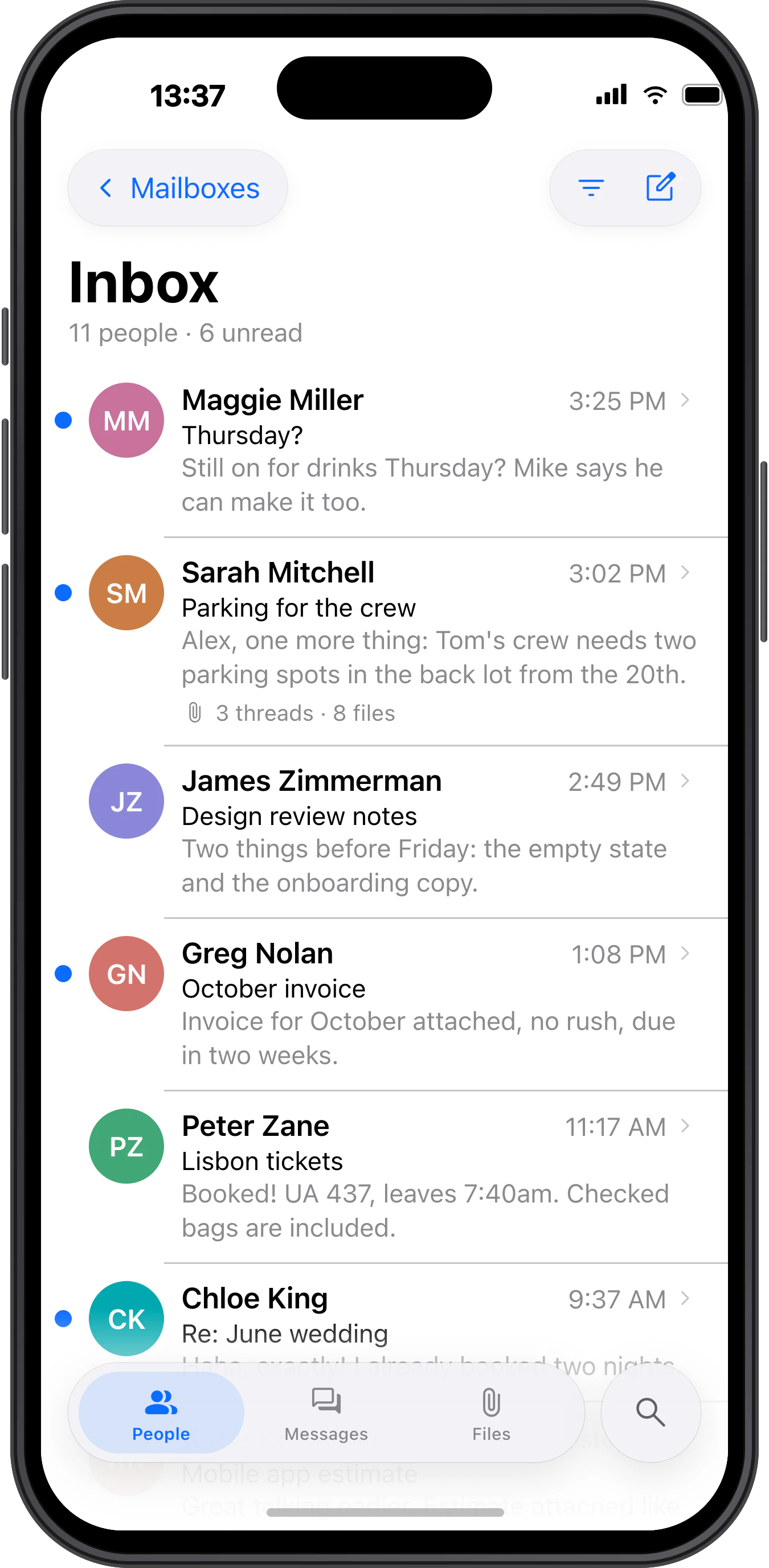
The same calm, on a smaller screen.
Send for iPhone is built from the ground up for the phone, with the same idea at its core: people first, updates out of the way. Free for personal use, like the Mac app.
Native Gmail support
Built for Gmail, not just connected to it. Labels, categories and sign-in work as they should.
People, not messages
One row per person, every thread inside it. Newsletters and receipts wait in Updates.
No middleman
Send talks to your provider directly. Nothing passes through our servers, ever.
Search that finds it
Words in any order, across every account and every year. Attachments too. Results in milliseconds.
Gmail, done right.
Native Gmail integration with familiar labels, inbox categories, and seamless account setup. All in a calmer, more focused email experience.
Your inbox has 11 people in it. Not 47 messages.
Same mail. Send just puts it back together. Stores, services, newsletters and robots write more than your friends do. In Send they wait in Updates until you have a minute. What’s left is people.
38 messages, 25 of them from robots. Try People.
Shortcuts you already know.
Send uses the keys Gmail taught you. Archive with e, reply with r, move with j and k. Nothing to learn, nothing to configure.
Press ? anywhere to see the full list.
The same calm, on a smaller screen.
Send for iPhone is built from the ground up for the phone, with the same idea at its core: people first, updates out of the way. Free for personal use, like the Mac app.
Your email stays yours.
Send talks directly to your email provider.
Nothing is stored or processed on our side.
No ads. No data monetization.
Keys handled for you. You just see a lock.
Send doesn’t depend on our servers. Your inbox stays accessible even if we stop developing the app.
Email clients forgot what they were for.
They grew calendars, to-do lists, chat, CRMs and an AI assistant* on top. The inbox became a dashboard. Send does one thing: email. And tries to do it better than anything else.
Read. Write. Send.
* We do have a send CLI for programmatic access, though. Your AI agent can use it to control your email client.
 doom.exeUnnecessary features
Let your AI agent do the chores.
Send has no AI built in: a mail client should be a mail client. Instead, its send command gives the agent you already use, like Claude Code or Codex, a programmatic way into your mail.
send mcp›Find last month's invoices and save the PDFs to ~/Invoices/2026-09.
$send search "invoice has:attachment date:2026-09" --json
12 messages
$send show 81234 81240 81251 … --text
9 invoices, 2 quotes, 1 payment reminder
$send attachments 81234 81240 81251 … --type pdf --save ~/Invoices/2026-09
Saved 9 files
Nine invoices are in ~/Invoices/2026-09. I left out two quotes and a payment reminder.
›Go through my newsletters. Which ones should I unsubscribe from?
$send search "unsubscribe after:90d" --json
1,284 messages from 46 senders
$send search "unsubscribe after:90d is:unread" --json
1,102 messages from 31 senders
You haven’t opened a single issue from 31 of your 46 newsletters in three months. I’d unsubscribe from those; the list is in ~/newsletters.md. The six you read every week are worth keeping.
›What came in today? Only what needs me.
$send search "in:inbox date:today" --json
41 messages
$send show 81402 81407 81419 … --text
41 messages, without the quoted history
Three need you. Greg wants the September invoices by Friday, Maggie asks if Saturday still works, and Tom is waiting to hear about the press kit. The other 38 are receipts and notifications.
›Tell Tom the press kit will be ready on Friday. Keep it short.
$send search "from:tom press kit" --json
1 message
$send draft reply 81315 --body-file reply.md
Draft saved in Send
The reply is in your drafts. Read it and send it when it looks right.
Eight principles we build Send by.
Good ideas don’t get old.
Every feature must earn its place. We’d rather do a few things exceptionally well than a hundred things poorly.
Every element should have a purpose. Actions belong where you expect them. Nothing should leave you guessing what to do next.
Beauty isn’t decoration. Every detail matters, from typography and spacing to the smallest interaction. Good software should be a pleasure to use.
Send is an email client. Not a calendar, a chat app, or a productivity platform. We put all our effort into making email exceptional.
Reading, replying, searching, or encrypting an email should feel effortless. We handle the complexity so you don’t have to.
Familiar shortcuts. Sensible defaults. Predictable behavior. Send should work the way you expect, without endless settings.
Great software spreads because people love using it. No trials, no locked features. Send is free for personal use, with every feature included. Commercial users support its development.
Nobody wants to spend their day managing email. The best email client is the one you can close with inbox zero.
Simple email. Simple pricing.
Free for personal use. Fairly priced for work. Every feature included.
We don’t believe in charging extra for features that should have been there from the start.
Mac and iPhone included · Prices in USD, excluding taxes · Teams billed annually
Questions
Does Send work with Gmail?
Yes, natively. Send talks to Gmail directly, so your labels, inbox categories and Google sign-in work the way you expect. iCloud, Fastmail and any IMAP server work too.
Is Personal really free?
Yes. Every feature, unlimited personal accounts, no ads. If you use a custom domain, outgoing mail carries a small Sent with Send signature. Pro removes it and covers professional use.
Is there an AI assistant?
No. No calendar, chat or task manager either. Send reads, writes and organizes email, and does that well. If you use an AI agent like Claude Code, it can work with your mail through Send’s command-line tool.
How does the People / Updates split work?
Mail from automated senders goes to Updates. You can move anything, and Send tells you why something landed where it did. No hidden rules.
Can I use it without a mouse?
Yes. Every action has a shortcut, and the defaults match Gmail’s. Press ? to see them all.
What do you collect?
Never your messages. Optionally, a minimal daily heartbeat (install, platform, version, country) so we know how many people use Send. You can turn it off in Settings.
When does it ship?
Pretty soon. macOS first, iPhone later. Leave your email: one message now to confirm it, one when Send ships. Nothing else, ever.
How do I reach you?
Write to hello@trysend.appI wonder which email client this opens. One day, hopefully Send.. A person reads it, usually the one who wrote the code.
Tell us what’s missing.
A bug you ran into, or something you wish your email client did. A person reads every one.